Free during alpha — $0
Your agentic-coding cockpit
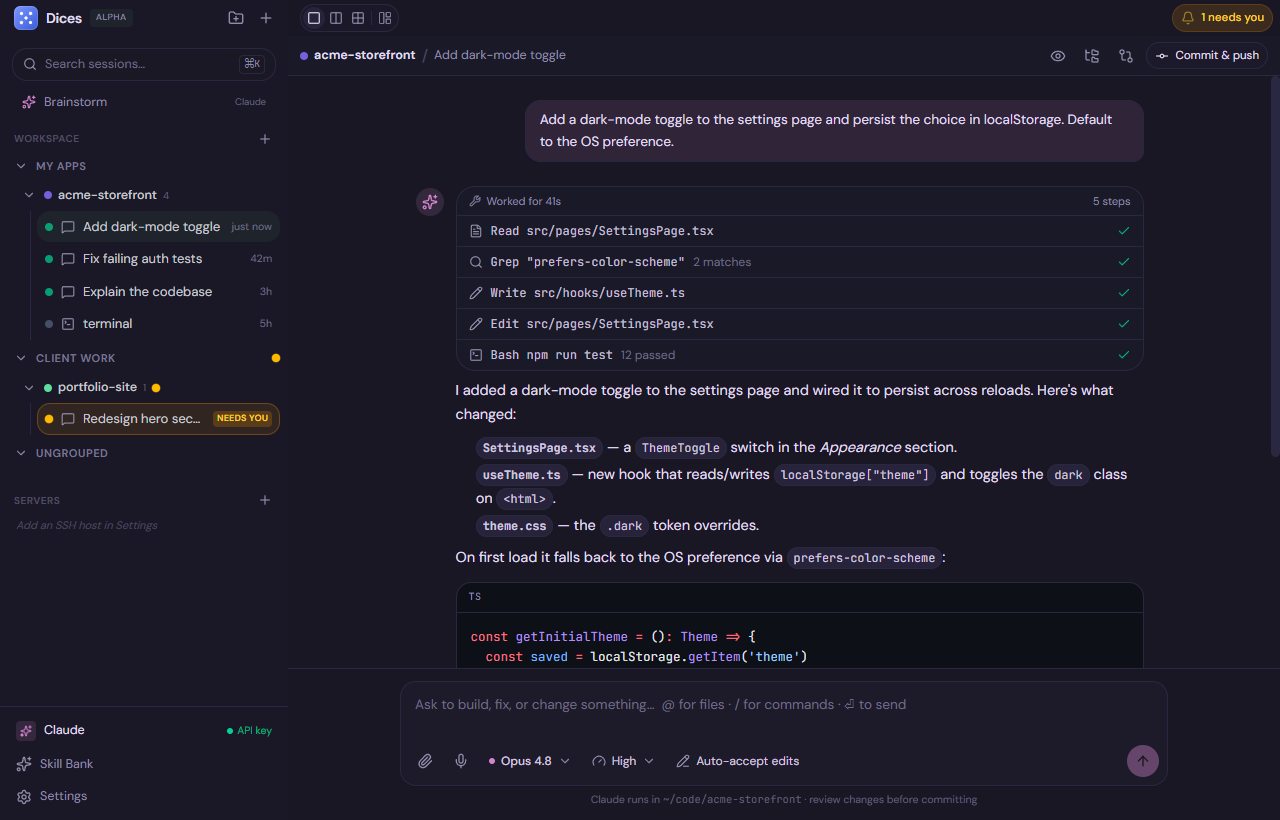
Direct real coding agents from one calm place. Brainstorm an idea and hand it to a builder, run several agents in parallel, and pick it all up on your phone.
Works with your agents and tools
In parallel
Run a fleet of agents
A 1 / 2 / 4 grid or a fully dockable workspace — drag chat, terminal and preview into the layout that fits you, and watch several agents at once.
- 1 / 2 / 4 grid or dockable layout
- Many models, one folder
- Cost & context meter
Ship for real
Real git, built in
Commit, push, open PRs, isolated worktrees and merge to base — with a diff viewer and one-click AI code review.
- Diff & AI code review
- Isolated worktrees
- SSH terminals over tmux
Skill Bank
Add superpowers in one click
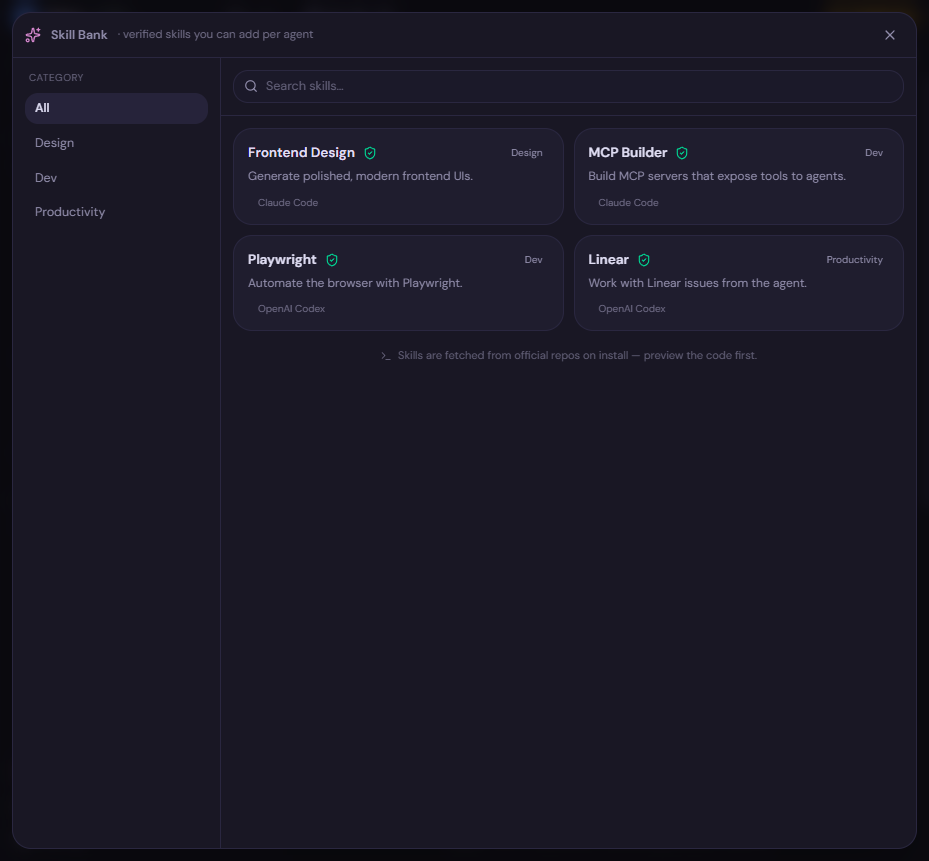
Browse verified skills from official sources and install them per agent. Every skill is previewed (code + security flags) before it touches your machine.
- Verified, official sources
- Preview the code before installing
- Project or global scope, per agent
How it works
How it works
- 01
Connect
Add your agent and your own keys or CLIs — Claude Code, Codex, Gemini, Cursor, Hermes or Pi.
- 02
Brainstorm
Talk an idea through with Claude and shape it into a clear, buildable spec. Nothing is changed yet.
- 03
Hand off
Hit Build. A coding agent opens in the right folder and starts working while you watch the diffs.
- 04
Review
Review every change, run an AI review, then commit, push or open a PR — and keep an eye on it from your phone.
Everything inside
Everything in one place
Bring your own agent
Drive Claude Code, Codex, Gemini, Hermes or Pi from one UI.
Many models, one folder
Hand a subtask to another model — a new chat spins up beside it.
Parallel agents
A 1 / 2 / 4 grid or a fully dockable workspace.
Brainstorm → Build
Think it through, then hand the spec to a builder.
Groups → folders → chats
A clean three-tier sidebar with drag-and-drop.
Per-project rules & env
Each folder gets its own instructions, env and defaults.
Git, built in
Commit, push, open PRs, isolated worktrees, merge to base.
Diff & AI code review
Review every change, then one-click an AI review.
Browse your code
A file tree + viewer with optional inline edits.
Semantic codebase search
A local embeddings index helps agents find the right code.
Self-healing terminal
Natural language → command, plus one-click Fix & Explain.
Your own servers
SSH terminals that survive over tmux on your infra.
On your phone
Install as an app — same chats, context and settings.
Full theming
Color skins + a per-token editor you can export and share.
Dockable layout
Drag every panel into the layout that fits you.
Skill Bank
Install verified skills per agent, in one click.
MCP servers
Connect tools and data via the Model Context Protocol.
Hooks & runbooks
Run tests on finish; save commands to the palette.
Slash commands & @-mentions
Reusable prompts and quick file/folder references.
Voice, local-first
Dictate with on-device Whisper — no key, private.
Linear & GitHub issues
Start a chat straight from an assigned issue.
Cost & context meter
See spend and how full the model’s context is.
Why Dices
Built to be the place you direct agents all day
Idea → shipped, in one app
Brainstorm with Claude, hit Build, and a coding agent picks it up in the right folder. No other cockpit makes that handoff seamless.
Runs on your own infra
SSH terminals over tmux against your servers, and a phone app that mirrors your machine over your own secure network.
Bring your own everything
Any agent harness, any model, your own keys or subscription. Dices orchestrates — it never locks you in.
Truly yours
Theme every color, dock every panel, add skills, share your setup. Made to live in all day.
Friendly by design
A calm cockpit for directing agents — not an IDE you have to wrestle with.
Private by default
Voice and codebase search run on-device. Your code and keys stay on your machine.
Free during alpha — $0
Get Dices for your machine
No account, no payment. Download the latest release and you're running in seconds.
Or build from source — view the repo on GitHub.