The Skill Bank
Browse and one-click-install verified agent skills from official repos, with a security gate before anything touches your machine.
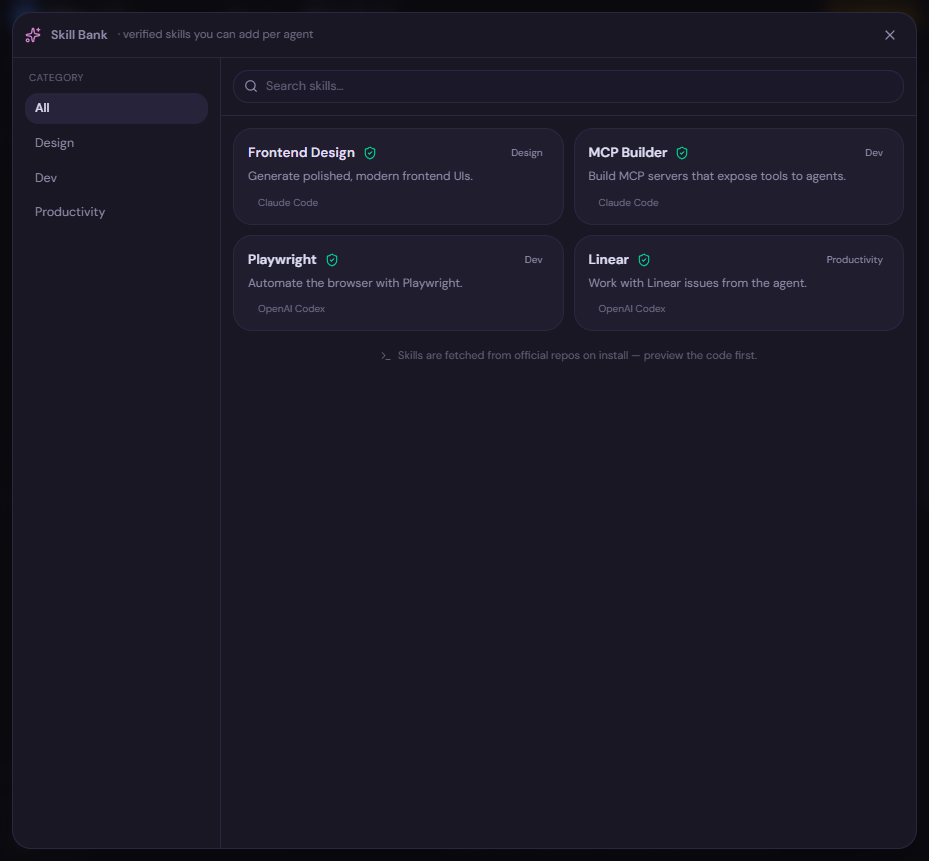
The Skill Bank is a Settings-sized pop-out for browsing and installing verified skills for your agents — one click per skill, scoped to the agent and folder you choose. Open it via “Skill Bank” in the sidebar.
What is a skill?
A skill is a reusable bundle of instructions (and sometimes scripts) that teaches an agent how to do a specific task well. The near-universal format is a SKILL.md folder: a folder containing a SKILL.md file that describes the skill, often alongside supporting files such as scripts, templates, or reference docs.
Because the SKILL.md folder format is shared across agents, the same skill can be installed for Claude Code, Codex, Gemini, and others — Dices just writes the folder to the right place for the agent you pick.
A curated, verified catalog
The Skill Bank catalog is curated from official repositories — for example anthropics/skills, openai/skills, and others. You’re browsing a vetted list rather than arbitrary code off the internet, and skills are fetched live from GitHub at install time so you get the current version.
Installing a skill
The flow is designed so you always see what you’re getting before it lands on disk.
- Find a skill — filter by category or use search.
- Click a skill to open its preview, which shows:
- The skill’s
SKILL.mdcontents. - The full file list in the skill folder.
- Security flags (see below).
- The skill’s
- Choose the agent the skill is for: Claude Code, Codex, Gemini, Cursor, Hermes, or Pi.
- Choose the scope:
- This folder — install for the current project only (the default).
- Global — install for all of your projects.
- Install. Dices writes the skill folder to the correct location for that agent — for example
~/.claude/skills,~/.agents/skills, and so on — fetched live from GitHub, with text Unicode-sanitized to strip hidden or deceptive characters.
Note: Scope defaults to project (this folder), so installing a skill won’t silently affect your other projects unless you explicitly choose Global.
The security gate
Skills can contain executable content, so the preview surfaces security flags before you install:
- Bundled
scripts/— the skill ships shell or other scripts that can run. - Shell-injection risk — patterns that could execute arbitrary shell commands.
- Pre-approved
allowed-tools— tools the skill declares it’s allowed to use without prompting.
If a skill is flagged as risky, Dices requires an explicit “I reviewed this” confirmation before it will install. This is a deliberate gate: installing a skill means trusting code that your agent can run, so Dices makes you look at the flags and acknowledge them rather than installing risky content silently.
Warning: Treat the security flags seriously. A bundled
scripts/folder or a pre-approvedallowed-toolslist means the skill can take actions on your machine. Read theSKILL.mdand file list in the preview before confirming “I reviewed this.”