Introduction
Dices is a desktop cockpit for directing real coding agents — brainstorm, build, and ship from one chat-first UI.
Dices is a desktop app that puts a friendly chat UI over real coding agents. Instead of wrestling an IDE or memorizing terminal commands, you describe what you want, watch the agent work, and review the results — all from one cockpit.
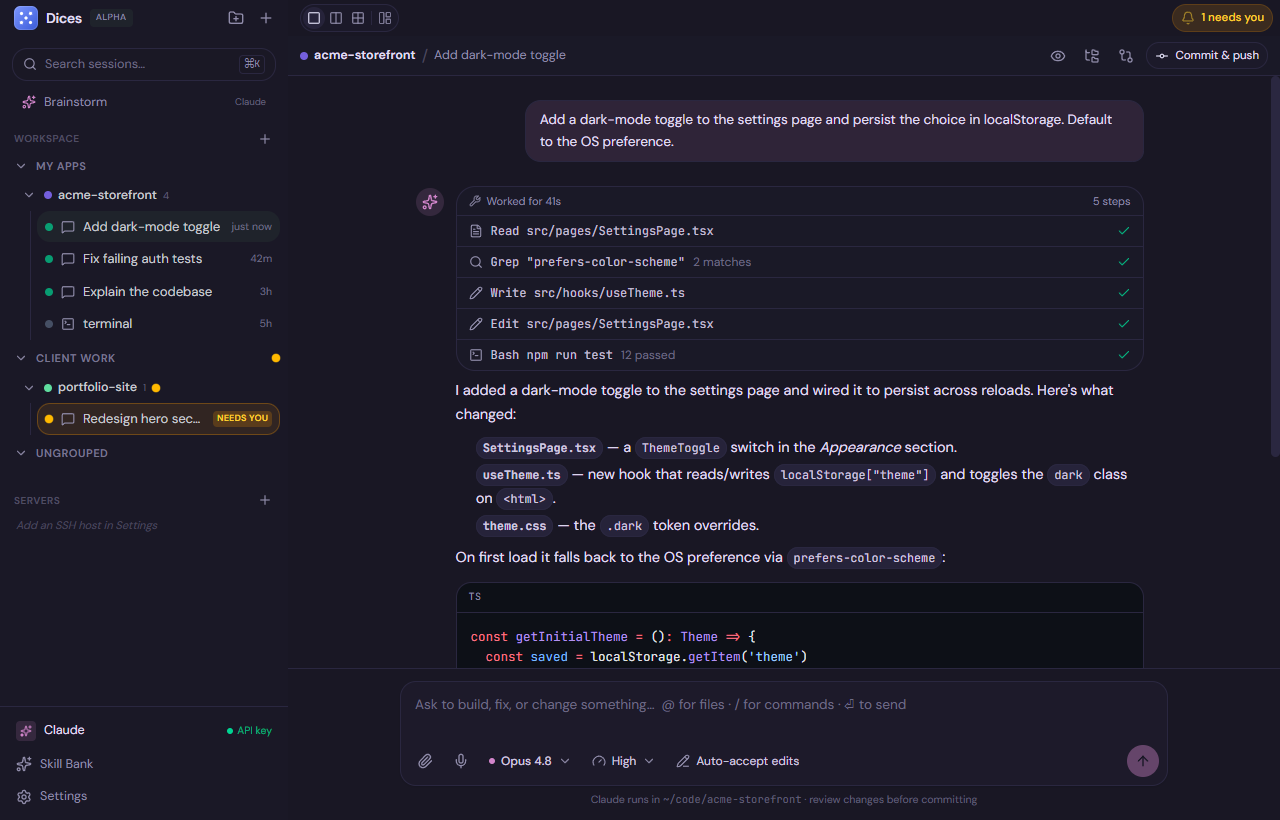
What Dices is
Dices runs Claude Code via the Anthropic Agent SDK in-process. That’s an important detail: it is not a terminal that wraps the claude command-line tool. It runs the same engine the CLI uses, but in-process, so the agent’s output arrives as structured data that Dices renders into a rich, clickable UI — diffs you can read, tool calls you can expand, approvals you can click.
It doesn’t stop at Claude. Through ACP (the Agent Client Protocol — JSON-RPC over stdio), Dices also drives other agents:
- OpenAI Codex
- Google Gemini
- Cursor
- Hermes
- Pi
You bring your own agent and model — your own Anthropic API key for Claude, or your own official CLI for the other agents. Dices is the cockpit; the engine is yours.
💬 Describe a task → 🤖 Agent works in a folder → 📝 Review the diff → 🚀 Commit & shipWho it’s for
Dices is built for two kinds of people who turn out to want the same thing:
- Beginners who want to build software without first learning an editor, a terminal, and a dozen CLI flags. You talk to an agent in plain language and it does the work.
- Pros directing agents who already know how to code but would rather orchestrate than type every line. You run several agents across several projects, pick the right model per task, and keep your hands on the wheel through permissions and diffs.
The common thread: Dices is not an IDE to wrestle. It’s a place to direct coding agents and review what they produce.
Tip: You don’t need to know Git, the command line, or any specific language to get started. If you can describe what you want, you can use Dices.
The big picture
A few core ideas shape everything in Dices.
Brainstorm → Build
Every good project starts with thinking, not typing. Dices gives you a dedicated Brainstorm space — a native Claude chat with no file tools — purely for planning, exploring ideas, and shaping a spec. When you’re ready, “Build this” hands the entire transcript to a brand-new coding-agent chat in a folder you choose.
💡 Brainstorm (no file changes) → 🔨 Build this → 🛠️ Coding chat in a folderSee Brainstorm → Build for the full workflow.
Your infrastructure, your keys
Dices doesn’t host a model or proxy your code through a server. You connect:
- Claude with your own Anthropic API key (created at console.anthropic.com, set in Settings, stored encrypted).
- Other agents authenticate in their own official CLI — you install the vendor CLI and sign in there; Gemini also needs a
GEMINI_API_KEY.
Your code stays on your machine, running in real folders you control.
Note: Dices never handles your provider credentials beyond your own API key — Claude uses your Anthropic API key; other agents authenticate in their own official CLI.
Bring your own everything
Agent, model, project layout, theme — it’s all yours to choose:
- Per-chat model picker, including Claude reasoning effort (low / medium / high / xhigh / max).
- Multi-model per folder — tell an agent “use Sonnet for this” and Dices spawns a new chat with that model (via the
open_chattool). - Permissions you control per chat: supervised, auto-accept edits, full access, or plan.
Fully yours to shape
Dices is heavily customizable: full theming (skins, a per-token editor, and Copy/Paste JSON), a dockable layout, a Skill Bank, and more. The cockpit bends to how you like to work.
How Dices differs
| Most tools | Dices |
|---|---|
| Terminal wrapping a CLI | In-process Agent SDK → structured data → rich UI |
| One agent, one model | Bring-your-own agent (Claude, Codex, Gemini, Cursor, Hermes, Pi) + per-chat model |
| Jump straight to code | Brainstorm first, then hand the whole plan to a build |
| Code runs in a vendor cloud | Your machine, your keys, real local folders + git worktrees |
| Fixed UI | Full theming, dockable layout, Skill Bank |
Where to next
- Install Dices — download, system requirements, and first launch.
- Quickstart — connect an agent and ship your first build in about five minutes.
- The Cockpit — learn the Groups → Folders → Chats hierarchy.
- Brainstorm → Build — go from idea to spec to running code.
Note: Dices is free during alpha and runs on Windows, macOS, and Linux.